RemotePC

    Menu

    • My Account
    • Sign Up
    • Login
    • RemotePC
    • Features
    • Pricing
    • Download
    • Remote Access Products
      • Remote Access for Consumers
      • Remote Access for Teams
      • Remote Access for Enterprises
      • Remote Access for HelpDesk

      Enabling RemotePC™ SSO for users

      Related Links
      • Single Sign-On
      • Set up SSO
      • Enabling SSO
      • Accessing SSO
      • Create your own IdP
      • Generate SCIM Token
      • FAQs
      • SSO via IdP
      • SSO via OneLogin
      • SSO via Okta
      • SSO via Keycloak
      • SSO via Azure AD
      • SSO via G-Suite
      • SSO via JumpCloud

      Enabling SSO for users

      Admin of Team or Enterprise accounts can either select SSO for login while inviting users to create an account or enable SSO for existing users.

      To invite SSO users,

      1. Log in to RemotePC via web browser.
      2. Go to the 'User Management' tab and click 'Add User'.
      3. Enter the user email address in the 'Email Address' field.
      4. Select group and other preferences for the user.
      5. Select 'Enable SSO'.

        RemotePC
        Note: If you select the checkbox, users won't have to set a password for their account.
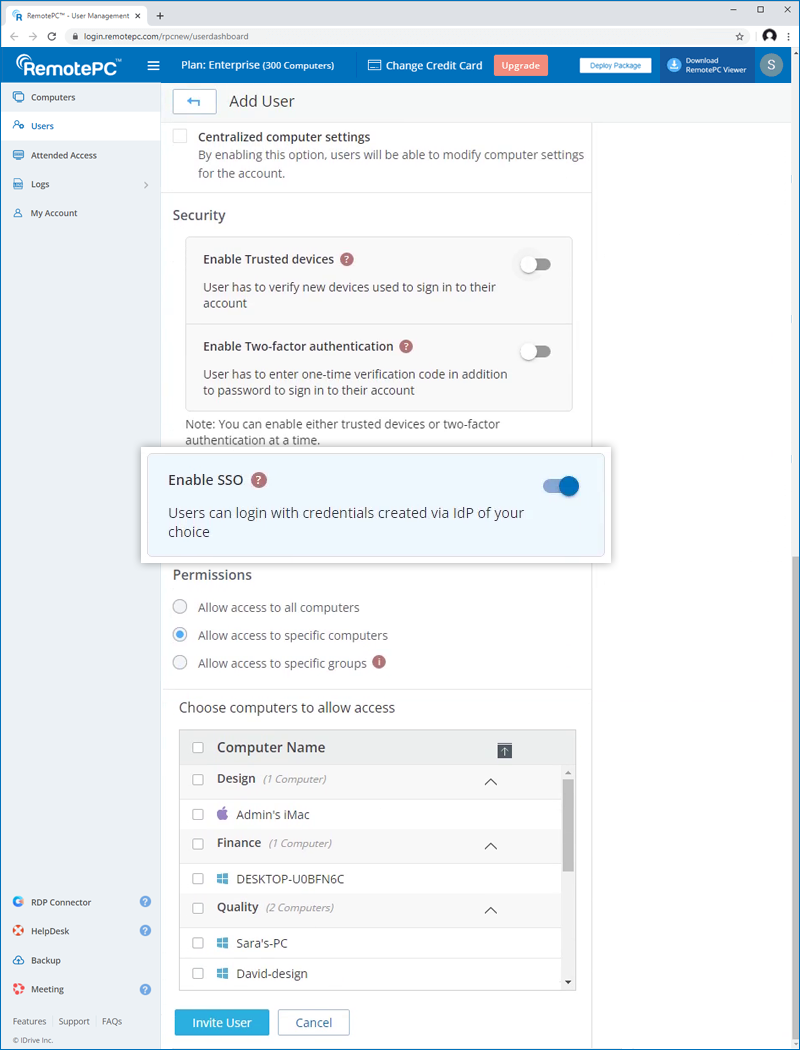
      6. Click 'Invite User'.

      The invited user will get an email with the link to register to RemotePC. Once the user registers, their account will be added to your account.


      To enable SSO for existing users,

      1. Log in to RemotePC via web browser and go to the 'User Management' tab.
      2. Hover on the user you want to edit and click RemotePC.
      3. Select 'Enable SSO'.
      4. Click 'Save'.

      Learn How To: Set up SSO RemotePC Enabling SSO for users RemotePC Accessing SSO account RemotePC Create your own IdP

      • RemotePC™
      • Features
      • Pricing
      • Team
      • Enterprise
      • Access via Web
      • Access via Mobile
      • RemotePC for Linux
      • Corporate
      • Get Started
      • Download
      • Sign Up
      • FAQs
      • Video Tutorials
      • Services
      • Partners
      • Compliance
      • Legal
      • Terms of Service
      • Privacy Policy
      • Acceptable Use Policy

      Support


      © IDrive Inc.